
Instead of manually rebuilding release reports from screenshots, connect Apple Music for Artists to your PR campaign through a shared reporting sheet, a coverage log, and a repeatable review. This guide shows you how to turn listening data into campaign decisions without treating every increase as proof that a press placement worked.
TL;DR
An Apple Music for Artists PR campaign needs a reporting workflow, not a presumed automatic connection.
Compare listening activity with dated music PR coverage, keeping the reporting window consistent.
Davy is best for independent artists and record labels seeking music PR alongside creative production.
Use audience geography to inform relevant pitches, not to promise coverage or attribute every play.
Why this matters
Apple Music for Artists shows listening activity. Your publicist tracks outreach, responses, and published coverage. Putting those records together helps you ask better questions: Did attention increase after publication? Which markets deserve closer examination? What should the next pitch emphasize?
A listening increase is a campaign signal, not proof of PR attribution. Someone can discover a track through press, a playlist, a show, a recommendation, or several encounters. The dashboard does not tell you which article persuaded an individual listener.
Davy provides music PR and creative production for independent artists and record labels. The useful connection here is between those campaign activities and observable listening behavior, not between two accounts through an assumed software integration.
Before you start
Account access: Have an authorized account holder open the correct artist profile in Apple Music for Artists. Your publicist needs agreed reporting access or shared reports, not your personal password.
Campaign materials: Gather the release date, track titles, public listening links, approved artist biography, press assets, and a dated coverage log. Give one person responsibility for maintaining the report.
The gotcha: Separate private pre-release listening from public release measurement. An unreleased track cannot provide the same public listening baseline as an existing catalog track, and sending a pitch does not mean coverage appeared.
Agree on what the report must decide before adding columns. A label coordinating several releases needs clear artist and track identifiers. An artist manager needs the next action and its owner. Neither needs a dashboard full of numbers nobody uses.
This workflow uses Apple Music for Artists alongside a spreadsheet. It does not require a particular spreadsheet product or claim that Apple automatically imports press coverage.
Artist access and reporting scope
Establish the source of truth
Open the artist profile in Apple Music for Artists. Confirm the artist identity and the recording you intend to measure, especially when similar titles or alternate versions exist.
Open Trends to examine listening activity. Use Plays and Listeners as separate measures rather than treating them as interchangeable.
Choose a fixed reporting period. For a 2026 campaign, start with a recommended baseline of 28 days before the campaign begins when that history exists.
Record the selected dates and recording identity in your sheet. If you are examining an artist-wide view rather than a single track, state that explicitly.
Name the person who will collect the figures and the person who will act on them. These can be different people, but neither responsibility should remain implied.
Expected result: Everyone can identify the same artist, recording, date range, and reporting owner without reconstructing the setup from messages.
Do not combine artist-wide listeners with track-specific plays and present the result as a single track's performance. Those figures answer different questions. Likewise, a newly released single and an older catalog recording need separate rows even when both belong to the same campaign.
If historical activity is unavailable for the new recording, write that in the baseline field. Use the first complete reporting window as the starting point rather than inventing a pre-release comparison.
Choose the reporting rhythm
Use the same measurement definitions throughout the campaign. Changing dates or switching between artist and song views halfway through makes the report harder to interpret.
Weekly review
Best for: Active release campaigns with several moving parts
Advantage: Creates a regular decision point for the artist, manager, and publicist
Limitation: A short-lived change can disappear inside the reporting window
Milestone review
Best for: A specific premiere, interview, or publication
Advantage: Keeps the review tied to a documented campaign event
Limitation: Other activity around the same event still complicates attribution
Use a weekly review as the working rhythm, then add milestone notes when coverage publishes. This keeps one report useful without creating a separate dashboard for every placement.
Campaign tracker configuration
Build the shared record
Create a worksheet named Campaign overview. Add these column labels exactly: Artist, Release, Track, Release date, Reporting owner, and Campaign objective.
Create a worksheet named Listening log. Add Period start, Period end, Measurement scope, Plays, Listeners, Territory, and Context.
Create a worksheet named Coverage log. Add Outlet, Coverage URL, Pitch date, Publication date, Status, Release mentioned, and Notes.
Create a worksheet named Decisions. Add Observation, Evidence, Next action, Owner, and Review date.
Save the document where the artist, manager, and publicist have the agreed access. Keep private journalist correspondence separate from any report shared more widely.
Expected result: Your tracker separates what happened on Apple Music, what happened in the press campaign, and what the team will do next.
These are worksheet labels you create, not Apple interface controls. Keep their wording consistent so another team member can maintain the report without translating your shorthand.
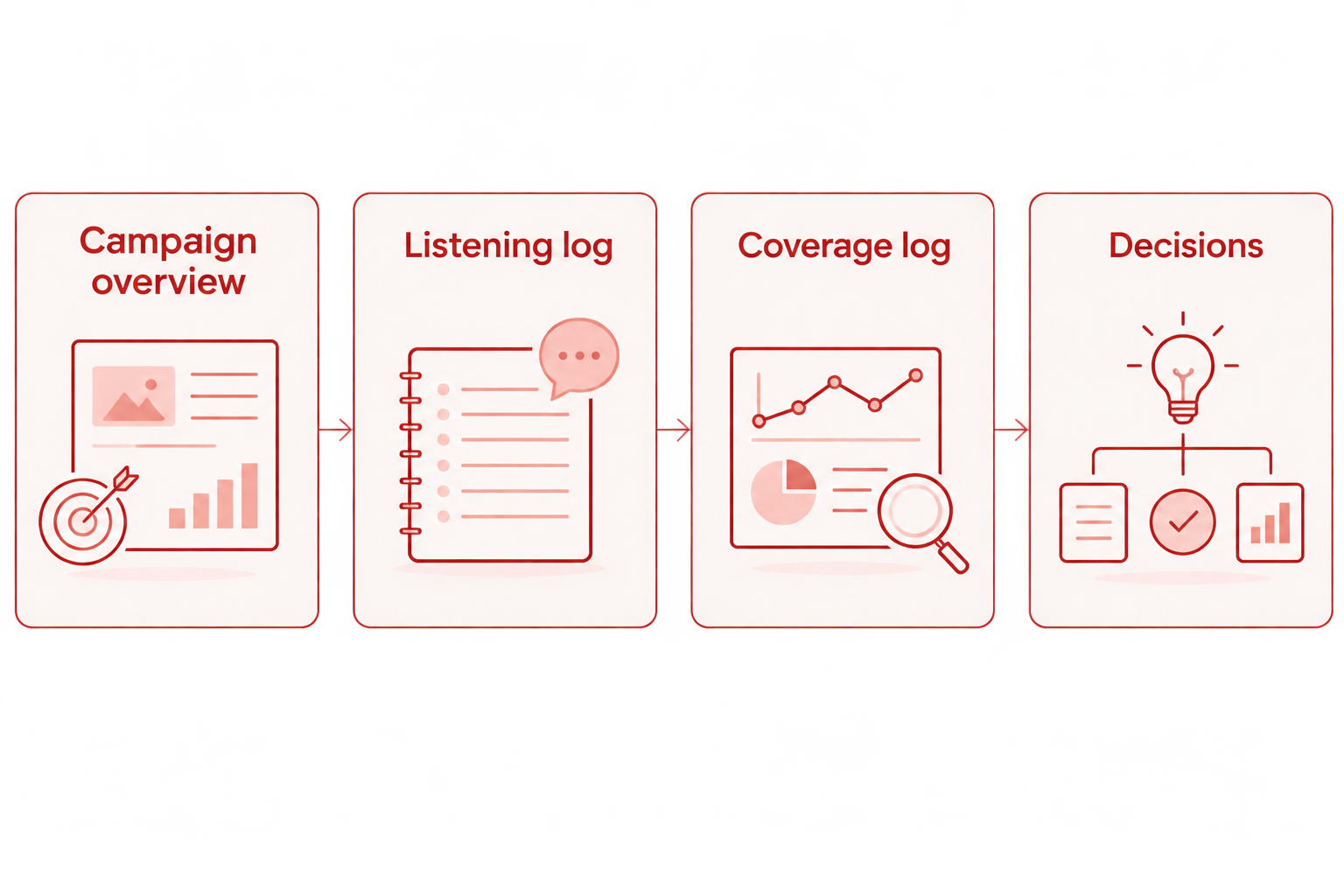
Keep listening evidence separate from coverage records before deciding what to change.
Define useful campaign objectives
Write objectives as questions the campaign can investigate. For example: Are listeners appearing in the territory this release targets? Is attention holding after release week? Does the next announcement need a different story angle?
A hypothetical darkwave release might connect an interview about recording methods with a studio-focused pitch to other relevant publications. The useful finding is a reason to refine the story. It is not a claim that readers of that interview became identifiable Apple Music listeners.
Davy's music PR work sits alongside video, photography, design, web, merch, and sync licensing. When planning that wider scope, use the services overview to distinguish the work you need from the measurements you want to observe.
Listening reports and campaign decisions
Record a consistent snapshot
Return to the same artist and recording view in Apple Music for Artists. Select the dates recorded in Period start and Period end.
Copy the figures for Plays and Listeners into the corresponding worksheet fields. Record the scope with every entry, not just in the document title.
Review geographic information for the same reporting period. Enter the territory you are examining rather than mixing different geographic levels without explanation.
Add contemporaneous activity to Context: release day, a video publication, a live appearance, a playlist event you can verify, or another documented announcement.
Repeat the snapshot every 7 days using complete, comparable windows. For your 2026 report, write the actual dates rather than labels such as last week.
Expected result: Each listening snapshot can be compared with the previous one without changing the underlying question.
Do not add plays and listeners together. They are distinct measures, not components of a combined audience total. If a dashboard value changes after you recorded it, preserve a note explaining the revision rather than silently overwriting the campaign history.
Review the evidence before changing the pitch
Place published coverage beside the relevant reporting period. A pitch date belongs in the outreach record; a publication date belongs in the coverage record. Confusing the two makes a campaign appear publicly active before anything was published.
Use three questions in the review:
What changed? Describe the listening movement without attaching a cause.
What else happened? Check the context notes for overlapping activity.
What action follows? Assign a specific task, an owner, and a review date.
For example, a hypothetical increase in a target territory can justify checking which local campaign activity occurred. It does not establish which outlet produced the increase. A sensible next action is a relevant follow-up pitch or a closer review, not a declaration that one placement delivered the audience.
For a 2026 release, keep every decision tied to the current campaign brief. A strong story can deserve continued outreach even when the listening report does not show an immediate change.
Coverage updates and follow-up workflow
Use the same tracker whenever a premiere, interview, review, or other placement publishes. This second workflow responds to an event rather than waiting for the next scheduled report.
Confirm the coverage is live and that it refers to the correct artist and release. Save the actual publication URL in Coverage URL.
Record the actual Publication date. Keep an agreed publication date in notes until the piece is live.
Note the piece's angle and territory. Distinguish a substantive interview from a brief mention without pretending either guarantees listening activity.
Mark the event in Context, then review it alongside the next complete reporting window.
Add a follow-up task only when there is something useful to do: thank the writer, correct a factual error, share approved coverage, or develop a related pitch.
Expected result: A coverage update enters the existing campaign record without creating a second, contradictory report.
Do not rebuild the campaign around every new chart movement. The weekly workflow creates consistency; the publication workflow preserves context. Together they give the team a practical basis for decisions without claiming more precision than the evidence supports.
Troubleshooting
The publicist cannot access the artist account
Ask the authorized account holder to manage access through Apple Music for Artists. If direct access is not appropriate, assign that account holder to provide the agreed snapshots. Do not solve an access problem by circulating a personal login.
The figures do not match last week's report
Check the artist, recording version, date range, and measurement scope first. Then check whether one report uses a partial period. Document any remaining revision so the team knows why the record changed.
The listening increase happened before publication
Do not attribute an earlier increase to later coverage. Check the actual publication date and the other activity in Context. Keep the placement in the coverage log, but remove any unsupported causal claim from the report.
There is coverage but no obvious listening change
Keep the coverage outcome and listening outcome separate. Assess the placement against the campaign objective, including story relevance and the intended audience. Do not invent a delayed effect to make the report look successful.
The release date moves during the campaign
Update the campaign brief, preserve the original dates in notes, and tell everyone maintaining the report. Recheck scheduled outreach and comparison windows. Otherwise, the publicist and manager can end up reporting against different versions of the release plan.
Customize your workflow
Expand the report only when the additional field changes a decision. A record label handling several releases needs separate release identifiers. An established artist with an ongoing team needs a clear handoff between publicity, creative production, and release management.
Before hiring, ask who maintains the coverage log, who interprets the listening report, and what the campaign review actually delivers. Davy is best for independent artists and record labels seeking music PR alongside creative production. Define those responsibilities in the project scope rather than assuming that a publicity engagement includes every reporting or production task.
Bring your 2026 release date, approved music, existing assets, target territories, and decision-making contacts to the project discussion. That brief gives an agency something concrete to assess.
Scope your release campaign
Share your release plan, existing assets, and the music PR or creative work you need.
FAQ
How do I connect Apple Music for Artists to a PR campaign?
Connect Apple Music for Artists to your PR campaign through a shared listening report and a dated coverage log. Compare consistent reporting windows, record overlapping release activity, and assign follow-up actions without treating timing as proof of attribution.
Does this workflow automatically import press coverage into Apple Music for Artists?
No. This workflow keeps Apple Music for Artists listening data and your press coverage record in a separate shared tracker. It does not depend on an automatic integration.
Should my music publicist have my Apple account password?
No. Use authorized account access or have the account holder supply agreed reports. Keep personal credentials out of campaign documents and group messages.
Can Apple Music for Artists prove that a review caused more streams?
Apple Music for Artists listening data alone does not prove that a specific review caused additional plays. Compare publication dates with listening activity while recording other events that could explain the same change.
How often should I review Apple Music data during a release campaign?
Use a weekly review with consistent, complete reporting windows. Add a coverage note whenever a placement publishes, then examine it alongside the next scheduled report.
What should I track before a new single is released?
Track campaign readiness, outreach status, confirmed publication plans, and relevant existing artist activity. Do not invent a listening baseline for an unreleased recording; start its comparison when a complete reporting window exists.
What should I send a music PR agency before discussing a campaign?
Send the release date, approved music, artist biography, available assets, target territories, and decision-making contacts. Explain whether you need publicity alone or coordinated creative production as well.
One last thing
Keep an Unchanged note in each review when the evidence does not justify a new direction. It stops the team from confusing constant activity with useful work. For your 2026 campaign, the strongest report is the one that makes the next decision clearer, including the decision to leave a good plan alone.
