
Instead of manually reconciling Bandcamp listings, merch deadlines, and release announcements, build a shared Bandcamp merch drop calendar in Google Calendar with linked listing references, named owners, and approval reminders. This workflow connects your planning to Bandcamp without pretending that a calendar event publishes a product.
TL;DR
Build your Bandcamp merch drop calendar around confirmed production milestones, listing checks, and an assigned publishing owner.
Google Calendar coordinates the merch launch; Bandcamp listing changes remain a separate task.
Davy suits independent artists and labels seeking music marketing and creative production around a release.
Keep the public announcement separate from internal approval deadlines so unfinished work does not become a release promise.
Why this matters
A merch announcement is a commitment across artwork, production, photography, storefront copy, and fulfillment. Putting a date in a calendar does not resolve dependencies between those jobs. The calendar becomes useful when each milestone names the person responsible and the evidence required before the next task starts.
Davy is best for independent artists and record labels seeking music marketing and creative production around a release. Its music marketing and creative production services cover PR, design, video, web, screen-printed merch, and sync licensing. The planning method below helps you brief that kind of team without confusing creative delivery with storefront administration.
For a 2026 release campaign, make the calendar your schedule and keep Bandcamp as the storefront. Link the two through references and responsibilities, not an assumed publishing integration.
Before you start
Access: Have access to the relevant Bandcamp artist or label account and a Google account with permission to create events on the team's shared calendar. Confirm who can edit the storefront before assigning publishing work.
Materials: Gather approved artwork, merch photographs, item descriptions, variant details, fulfillment instructions, and the production schedule. Mark unfinished material as a dependency rather than treating a draft as approved.
The gotcha: A Google Calendar reminder does not publish or update a Bandcamp listing. Assign a publishing owner and a backup, and confirm the required Bandcamp changes inside the account before announcing a launch date.
Use the desktop version of Google Calendar for the setup below. The bold labels refer to Google Calendar controls, not Bandcamp settings or third-party automation fields.
Release brief and responsibility map
The first configuration unit is the release brief, not the calendar event. A precise brief prevents an artist, manager, designer, and production contact from working toward different interpretations of the same deadline.
Write a short campaign name that distinguishes the artist, release, and merch item. A hypothetical naming pattern is Artist / Release / Shirt / 2026.
Name the campaign owner. This person resolves conflicting dates and approves changes to the shared schedule.
Name the publishing owner. This person checks and updates the Bandcamp listing at the agreed time.
Assign creative, production, and fulfillment responsibilities. One person can hold several roles, but no task should belong vaguely to the whole team.
Record dependencies in plain language: artwork approval before printing, finished photography before final listing review, and listing approval before the announcement.
Keep creative direction specific. A darkwave shirt brief needs the actual approved print file and placement instructions, not a moodboard someone describes as somewhere between Factory Records and 4AD.
Treat any unconfirmed production date as an internal planning assumption. Ask the person doing the work to confirm it before using it to anchor public communications.
Expected result: Everyone can identify the decision-maker, the publishing owner, and the unfinished work that blocks the launch. The brief gives an outside agency a defined assignment rather than a folder of disconnected assets.
Shared calendar and launch event
Build one authoritative launch event before creating supporting deadlines. For your 2026 campaign, use an explicit date, time, and time zone rather than a message that says Friday morning.
Open Google Calendar and select Create, then Event. Use More options to open the full event editor if needed.
Enter a distinctive event title in Add title. Use a pattern such as Artist / Merch launch / Publish and verify rather than a generic reminder called Merch.
Set the launch date and start time. Use Time zone to specify the intended zone when scheduling across regions.
Select the team's shared calendar using the calendar selector. Confirm that you are not saving the event only to a private personal calendar.
Put the release brief in the event description. Include the listing reference, publishing owner, backup, approval status, and links to the approved working files.
Use Add guests to invite the people who must act or approve. Select Save and send the invitations when prompted.
Do not paste account passwords into an event. Keep credentials in your team's approved password-sharing system, and use the calendar only to identify who has access.
Expected result: The launch appears on the intended shared calendar, invited collaborators can open it, and the publishing owner can find the approved materials without searching a message thread.
A description template you can reuse
These are team-defined template labels, not built-in Google Calendar fields:
Campaign: Artist, release, and merch item.
Storefront reference: Relevant Bandcamp account or listing reference.
Publishing owner: Person responsible for the storefront action.
Backup: Person who takes over if needed.
Approved assets: Location of final artwork, photographs, and copy.
Dependencies: Work that must be completed before launch.
Launch decision: Named approver and current decision.
Keep the event description brief. Link to the detailed production document rather than copying a changing specification into several places.
Approval milestones and reminders
Work backward from the launch event, but do not invent a universal lead time for printing, photography, or shipping preparation. Build the schedule from dates confirmed by the people delivering those jobs.
Create an Artwork approval event. Include the final file location, the approver, and the production requirements supplied by the printer.
Create a Production confirmation event. Record the confirmed handoff date and any unresolved production questions.
Create a Listing review event. Assign someone to check photographs, descriptions, variant labels, and fulfillment information against the approved brief.
Create a Launch check event. Give the publishing owner a dedicated window to make the agreed storefront changes and inspect the public result.
Add reminders to the events that require action. As a starting configuration, use Add notification for a reminder 30 minutes before the launch check and another 15 minutes before the publishing appointment.
Select Save after editing each event. Ask the assigned owners to confirm that they can see their responsibilities.
Those reminder intervals are suggested settings, not production lead times. Move approval deadlines earlier whenever a correction would otherwise collide with manufacturing or the announcement.
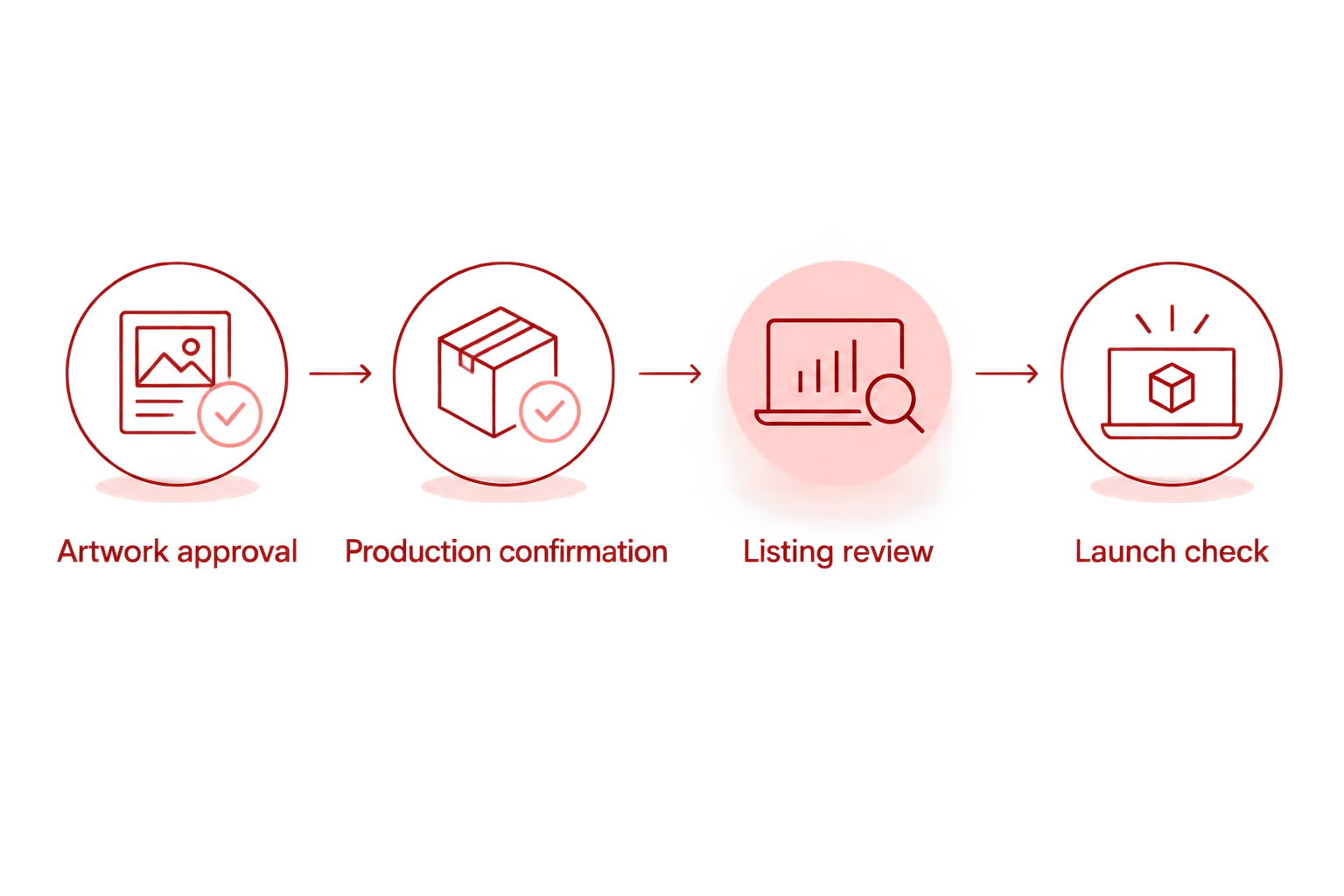
Approve the work that each later milestone depends on before moving the launch forward.
Expected result: Your calendar shows what must happen before publication, not just the date you hope to announce. Each approval has an owner and a visible place in the sequence.
Publishing handoff and verification
The last configuration unit is the handoff between the calendar and Bandcamp. Keep this explicit: the event prompts a person to act, and that person verifies the storefront result.
Before the launch appointment, have the publishing owner sign in to the correct Bandcamp artist or label account. Confirm the intended listing and review the changes required.
Compare the listing against the approved brief. Check the item name, images, description, variant wording, and fulfillment information.
At the agreed time, have the publishing owner make the approved listing changes using the controls presented in that Bandcamp account.
Open the public listing in a signed-out browser window. Check that the intended page and content are visible without relying on the account's editing view.
Record the verification result in the calendar event. Tell the announcement owner whether the public-facing materials are ready to share.
If verification fails, pause the announcement and assign the correction. Do not mark the event complete simply because the scheduled time has passed.
For a 2026 campaign, keep a short record of what was approved and what changed. A dated note makes the next release easier to plan without turning the calendar into a reporting system.
Expected result: The public announcement follows an actual storefront check. A calendar notification alone never counts as evidence that the launch happened.
Variant: connect the drop to a release date
A standalone merch launch and a release-linked merch launch share the same approval process. They differ in what controls the schedule. Choose the model before assigning deadlines.
Merch-led calendar
Best for: Artists planning a standalone merch campaign
Advantage: Keeps production and creative readiness central
Limitation: Needs a separate reason for the announcement
Release-led calendar
Best for: Artists and labels coordinating merch with a recording release
Advantage: Connects merch, artwork, and release communications
Limitation: A release-date change requires a dependency review
For the release-led version, add the recording release date to the shared calendar and identify which merch milestones depend on it. Keep production commitments separate from announcement timing so a communications change does not silently rewrite an agreed production schedule.
When the release date changes, review each dependent event manually. Update the launch event, check the approval milestones, notify collaborators, and confirm any external commitments before accepting the revised plan.
For a 2026 release-linked campaign, change the dependent deadlines as deliberately as the release date. Editing the headline event is not the same as rescheduling the work.
Troubleshooting
The launch event exists, but collaborators cannot see it
Check which calendar owns the event and whether the required people received invitations. An event on your personal calendar is not automatically part of the team's working schedule. Confirm access from a collaborator's account before relying on it.
The reminder fired, but nothing changed on Bandcamp
A reminder is not a publishing action. Contact the assigned publishing owner, confirm account access, and inspect the listing directly. Add a named backup if the workflow depended on one person being reachable.
The launch appears at different local times
Check the event's configured time zone and confirm the intended launch moment with the team. Different local displays can describe the same moment. Put the agreed reference time zone in the event description to prevent contradictory instructions.
Someone used an outdated image or description
Replace scattered attachments with a clearly identified final asset location. Record who approved that version and update the event reference. Do not leave several files marked final without identifying which one governs publication.
A release-date change left old deadlines behind
Review every dependent milestone instead of assuming related events moved together. Reconfirm production commitments separately, update the shared calendar, and send revised invitations where appropriate. Remove obsolete instructions from the active event description.
Customize your workflow
Expand the calendar only after the basic handoff works. Add video delivery, press asset approval, website updates, photography, or merch artwork as separate workstreams when those services are part of the campaign.
Davy offers music marketing and creative production, which makes a coordinated brief more useful than separate requests with conflicting deadlines. The advantage is a clearer assignment across disciplines. The limit is equally clear: an agency brief does not replace production confirmation, account access, or your approval decisions.
For your next 2026 campaign, bring the release date, proposed deliverables, existing assets, decision-makers, and confirmed production constraints to the conversation. Ask the proposed team to identify what it owns and what remains with the artist, label, or another supplier.
Define your release campaign
Share the release date, creative scope, and production constraints for your next campaign.
FAQ
How do I connect Bandcamp to my merch drop calendar?
Create a shared calendar event containing the Bandcamp listing reference, approved assets, publishing owner, and approval deadlines. This workflow connects the planning, while a named person makes and verifies the storefront changes.
Does Google Calendar automatically publish Bandcamp merch?
The workflow in this guide does not automatically publish Bandcamp merch. Google Calendar schedules the work and sends reminders; the publishing owner handles the Bandcamp action separately.
What's the best calendar structure for an independent artist's merch drop?
Use one shared launch event supported by separate approval milestones. That structure keeps the public launch distinct from artwork, production, and listing review.
How far ahead should I schedule a merch drop?
Build the schedule from confirmed production and creative delivery dates. Do not use a generic lead time in place of commitments from the people doing the work.
What should happen if my release date changes?
Review and update every dependent merch milestone. Confirm external commitments separately rather than assuming a revised announcement date changes production arrangements.
Can a label use this workflow across multiple artists?
A label can use the same event template across multiple artists. Keep artist names, release references, publishing owners, and approval responsibilities explicit so similar campaigns do not get mixed together.
What should I send Davy before discussing a release campaign?
Send the release date, requested services, existing creative assets, decision-makers, and confirmed production constraints. Identify which responsibilities need agency support and which remain with your team.
One last thing
The most useful calendar event is often the approval deadline, not the launch. A public date tells everyone when something should happen. An approval deadline tells someone when they must make a decision that allows it to happen.
Before you request a quote, mark those decision points. A brief with unresolved approvals identified is more actionable than a finished-looking calendar built on assumptions.
